
Box Plot: أداة قوية لتصور البيانات
المخطط المربع هو تمثيل رسومي يوضح المقاييس الإحصائية الرئيسية لمجموعة البيانات - الحد الأدنى، والربيع الأول، والوسيط، والربيع الثالث، والحد الأقصى. يتم استخدامه على نطاق واسع في تحليل البيانات لتصور توزيع البيانات وانحرافها.
المقدمة
The مخطط الصندوق، المعروف أيضًا بمخطط الصندوق والشارب، هو تمثيل بياني يُلخص خمسة أرقام لمجموعة بيانات: الحد الأدنى، والربيع الأول (النسبة المئوية 25)، والوسيط (النسبة المئوية 50)، والربيع الثالث (النسبة المئوية 75)، والحد الأقصى. طُوّر هذا النظام البياني على يد جون توكي في سبعينيات القرن الماضي، واشتهر بتقديمه الموجز لتوزيع البيانات، مما يُسهّل عملية تحليل البيانات عملية.
تُعدّ هذه الأداة فعّالة فيتحليل البياناتلقدرتها على إبراز النزعة المركزية والتشتت والالتواء في مجموعة البيانات بوضوح. كما أنها تُظهر القيم الشاذة بفعالية، مما يُقدّم صورة شاملة لتوزيع البيانات. وهذا مفيدٌ للغاية عند مقارنة مجموعات بيانات متعددة، إذ يُتيح عرضًا مرئيًا واضحًا ومقارنًا لتوزيعات البيانات المختلفة.
إضاءات
- يمثل Box Plot بيانياً خمسة مقاييس إحصائية مهمة لمجموعة البيانات.
- يشير الوسيط الموجود في المربع إلى الاتجاه المركزي للبيانات.
- تعكس الربعتان Q1 وQ3، اللتان تحددان نهايات الصندوق، تشتت البيانات.
- تصل شعيرات مخطط الصندوق إلى الحد الأدنى والحد الأقصى لنقاط البيانات غير المتطرفة.
- يتم حساب القيم المتطرفة كنقاط بيانات تقع تحت (Q1 - 1.5IQR) أو أعلى (Q3 + 1.5IQR).
عنوان الاعلان
وصف الإعلان. لوريم إيبسوم دولور سيت أميت، consectetur adipiscing إيليت.
المكونات الأساسية لمؤامرة الصندوق
A مخطط الصندوقأداة متعددة الاستخدامات تُمثل بصريًا المقاييس الإحصائية الرئيسية. ويتكون من عدة مكونات، يقدم كل منها رؤى مميزة حول توزيع البيانات.
المركزي في مخطط الصندوق هوالوسيط، المُمثَّل بخط داخل الصندوق، عنصرًا أساسيًا في مخطط الصندوق . أما وسيط الربيع الثاني (Q2) فهو القيمة الوسطى التي تفصل البيانات إلى نصفين، ويقيس النزعة المركزية، مُقدِّمًا لمحةً عن مركز البيانات.
بعد ذلك، يُحدد المربعبالربيع الأول (Q1) and the الثالث (Q3). يُمثل هذان الربيعان المئين 25 والمئين 75 من مجموعة البيانات، على التوالي. يُمثل Q1 الوسيط للنصف الأول من البيانات، بينما يُمثل Q3 الوسيط للنصف الثاني.
يمثل طول المربعالمدى الربيعي (IQR)، ويُحسب بطرح الربع الأول (Q1) من الربع الثالث (Q3) (IQR = Q3 – Q1). يقيس المدى الربيعي (IQR) النصف الأوسط من البيانات، ويقيس مدى تشتتها أو انتشارها.
The الشعيراتهي خطوط تمتد من الصندوق، تصل إلى نقاط البيانات غير المتطرفة الدنيا والعليا. عادةً، يمتد الشوكة السفلية من Q1 إلى أصغر نقطة بيانات غير متطرفة، ويمتد الشوكة العليا من Q3 إلى أكبر نقطة بيانات غير متطرفة.
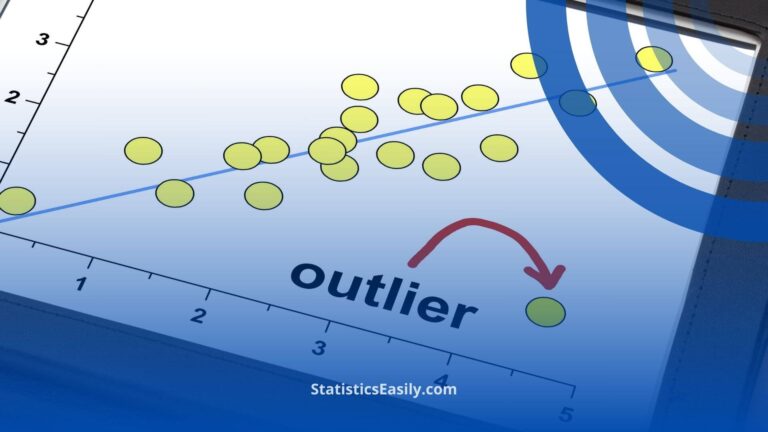
القيم المتطرفةعادةً كنقاط بيانات تقع أسفل (الربيع الأول - 1.5IQR) أو أعلى (Q3 + 1.5المدى الربيعي). وتُمثل هذه القيم الشاذة كنقاط فردية خارج الخطوط الشعاعية في مخطط الصندوق.
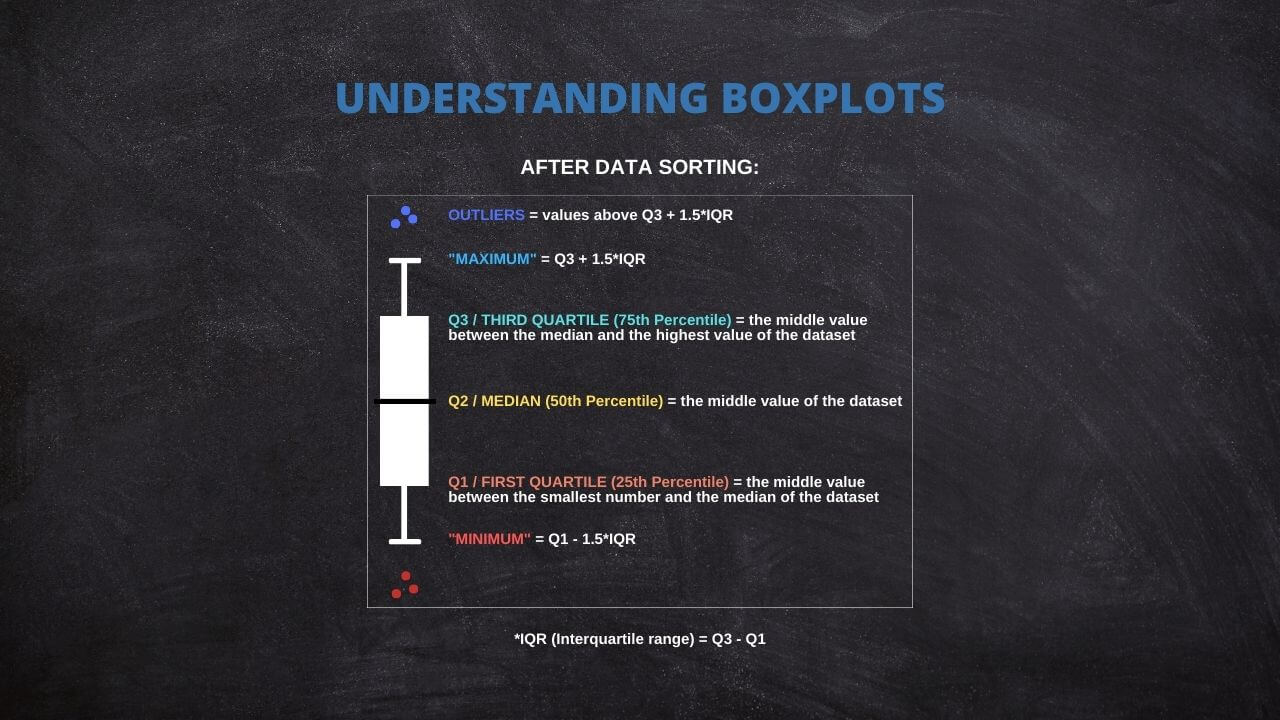
إن فهم هذه المكونات في المخطط الصندوقي يسمح بالفهم السريع لتوزيع البيانات وانتشارها وانحرافها. كما أنه يساعد في تحديد وتصور القيم المتطرفة المحتملة، والتي يمكن أن تكون لا تقدر بثمن في تحليل البيانات.
قم بإنشاء مخططات الصندوق الخاصة بك: أداة تفاعلية
اتبع هذه الإرشادات لإنشاء مخطط الصندوق التفاعلي الخاص بك:
1. عدد مخططات الصندوق: أدخل عدد مخططات الصندوق التي تريد إنشاءها.
2. تسمية المحور السيني: أدخل التسمية المطلوبة للمحور السيني.
3. تسمية المحور الصادي: أدخل التسمية المطلوبة للمحور الصادي.
لكل مخطط مربع تريد إنشاءه، قم بتوفير المعلومات التالية:
4. اسم مخطط الصندوق: أدخل اسمًا فريدًا لكل مخطط صندوق.
5. بيانات مخطط الصندوق: أدخل بيانات كل مخطط صندوق في حقل النص المخصص. تأكد من إدخال نقطة بيانات واحدة في كل سطر.
بمجرد إدخال البيانات الخاصة بك، انقر فوق الزر "تحديث المؤامرة" لإنشاء قطع الأراضي الخاصة بك.
Guide to Create a Box Plot on R
R is a go-to language in data science because of its statistical computation and graphic generation robustness. Let's take a quick tour of creating a Box Plot using R.
Firstly, install and load the ggplot2 package:
install.packages("ggplot2")

library(ggplot2)
Suppose you have a dataset and wish to create a box plot of a variable, var. The code snippet would be:
ggplot(data, aes(x = "", y = var)) +

  geom_boxplot() +

  theme(axis.title.x=element_blank())
This creates a simple box plot. To add more complexity or visual features, ggplot2 offers a other options that can be appended to this code.
Practical Applications of Box Plot
Box Plots find their usage in a wide range of real-world applications. For instance, box plots can be used in healthcare to compare the effectiveness of different drugs or treatments. They may be used in finance to compare the performance of other investment portfolios.
A powerful application of box plots is in A/B testing, where they can help determine if there's a significant difference between the groups. Furthermore, they're frequently used in exploratory data analysis for identifying outliers and understanding the data distribution.
The Versatility of Box Plots
While the traditional components of a Box Plot include the minimum, first quartile (Q1), median, third quartile (Q3), and maximum, it's worth noting that some statistical software offers flexibility in defining these measures.
For instance, specific programs allow replacing these traditional measures with others, such as mean, standard deviation (SD), confidence intervals (CI), etc. This adaptability will enable users to tailor their box plots to suit their specific analytical needs or preferences.
Thus, box plots remain not just a fundamental tool for data visualization but a versatile one that can be customized across different software platforms. Always review the documentation or the settings of your chosen statistical software to fully leverage these capabilities.
Common Misconceptions When Using Box Plot
Box Plots can sometimes be misinterpreted despite their utility, leading to flawed conclusions. A common misconception is to equate the box's length with the number of data points. In reality, it represents the data's spread.
Another error is in the interpretation of outliers. Outliers are not necessarily "bad" data points to be eliminated but may provide important insights about the dataset. Therefore, careful consideration is required before any decision to remove them.
Lastly, while box plots are efficient for summarizing data, they do not show the data's shape in detail, as a density plot or a histogram would. Therefore, they are best used with other data visualization tools for a more complete data analysis.
Ad Title
Ad description. Lorem ipsum dolor sit amet, consectetur adipiscing elit.
Recommended Articles
Interested in learning more about statistics and data analysis? Explore our blog for more articles and tutorials that will help you enhance your data skills!
- How To Select The Appropriate Graph?
- Create Great Graphs Easily (+Bonus)
- Which is Better, Mean or Median?
- Boxplots - an overview (External Link)
- How to Create Regression Lines in Excel
- Box Plot Skewness: A Visual Guide to Asymmetry
Frequently Asked Questions (FAQ)
It's a graphical representation of a five-number summary of a dataset: minimum, Q1, median, Q3, and maximum.
Box Plots provide a visual summary of data distribution. They are handy for identifying outliers and skewness in the data.
The box represents the IQR, covering 50% of data points from the first quartile (Q1) to the third quartile (Q3).
The line inside the box signifies the median, a measure of the data's central tendency.
Outliers are typically represented as individual points outside the whiskers in the box plot.
Outliers are usually calculated as data points that fall below (Q1 - 1.5IQR) or above (Q3 + 1.5IQR).
Some statistical software allows replacing traditional measures with others such as mean, standard deviation, confidence intervals, etc.
Whiskers extend from the box to the minimum and maximum non-outlier data points, thus showing the range of the data.
You can input your data and create a box plot with statistical software like R or Python or an interactive web tool.
Yes, Box Plots are widely used in fields like healthcare, finance, and A/B testing for quick visualization and interpretation of data.